
Every feature, in one place
Velrae Method is a personalized food scanner built for people living with conditions, allergies, and the realities of caring for someone else's body too.
This is the real app, embedded as a try-before-you-download seat. Tap around — Scan something, open Settings, build a meal. Everything on this page describes a real surface you can reach in the frame above. When you install the app on your phone, you start fresh with your own profile.
Scan anything
Food, recipes, restaurant dishes and personal care — by camera, barcode or typing. About five seconds each.
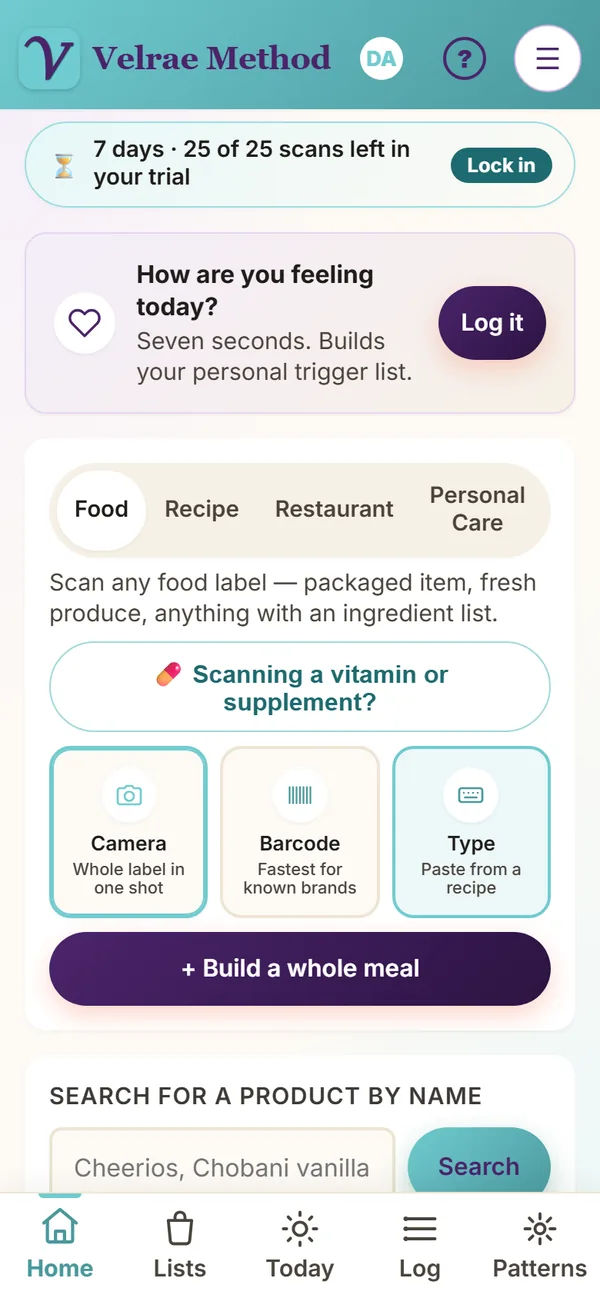
Scan — four modes, five seconds each
Different situations need different tools. Velrae has all four on one tab.
Camera, barcode, or paste
Three ways to grab a label.
Camera reads the whole label in one shot. Barcode is fastest for products already in your local store. Type lets you paste an ingredient list from anywhere.
Five seconds in the grocery aisle — or at home, looking at a package you already own.
Scan a label off the bathroom shelf
Shampoo, lotion, sunscreen, makeup.
Switch to Personal care, then camera, barcode, or type — the same three ways as food. Velrae reads the ingredient list and grades it against the conditions you’ve set, for your skin.
A product that’s “clean” for everyone can still be wrong for you. Included — not a separate add-on.
Grade what you’re about to cook
Same idea, recipe-shaped.
Paste a recipe’s ingredient block, or photograph it from a cookbook. Velrae grades the full dish against your conditions before you ever turn on the stove.
Decide whether to make it before you start the prep.
Describe the dish, or snap the menu
Type or speak what’s on the menu — or photograph the menu page and pick what you’re ordering.
“Egg salad sandwich on rye, with chips.” Velrae infers the hidden ingredients (the mayo, the cooking oil, the salt) and the portion based on the venue type — casual, diner, fast food, fine dining — then grades it against your conditions.
You can finally get a grade at a restaurant, not just at the grocery store. Available as an add-on — $9.99/year or $29.99 lifetime, no monthly. Your free trial includes 3 restaurant scans. See pricing.
Reading the label — and saying when it can’t
Allergens, in six languages
Pick the allergens you want flagged and Velrae warns you on every scan — reading the whole label, including allergen words in Spanish, French, Italian, Portuguese, German and Dutch.
It reads the label only. Always check the package, and it can’t catch “may contain.”
Looked up for you
An ingredient Velrae doesn’t know yet is looked up on the spot and remembered, so the next scan with it is instant.
Fewer “couldn’t recognize” rows every week.
When a photo can’t be read
If a label photo can’t be read, Velrae says why — and offers Try again or Type the ingredients. Smart Scan tries again on its own when the signal drops.
No guessing at a blurry label.
Build a whole meal — five ways to add anything
Sometimes a single product isn’t the question — the question is “is this whole plate okay for me.”
Five paths in, one grade out
Open Scan → + Build a whole meal. Add ingredients five ways: Describe in your own words · Speak ingredients · Scan a label · Pick from Pantry · Or type the name. Stack them in one bowl. Hit grade.
Type “Mom’s hummus, pita, cucumber, olives” — get a real grade. No measuring, no calorie database, no logging each ingredient by hand.
Vitamins & supplements — the facts, not a grade
A supplement label isn’t built like a food label. Velrae reads the Supplement Facts panel the way it’s structured — the real vitamins and minerals with their doses and best-absorbed forms, kept separate from the fillers. It doesn’t put a letter grade on a supplement; you get honest, plain-English things to watch instead — like a dose over the safe limit, or an ingredient that may not fit one of your conditions. Every flag is cited.
Personal care — your skin has conditions, too
The same engine that grades your food reads your shampoo, lotion, sunscreen, and makeup — for your skin, not a one-size-fits-all safety score.
Read for your skin, not everyone’s
Switch to Personal care, scan the label, and Velrae checks it against the conditions you’ve set — flagging what’s worth a second look for your skin, in plain English. A product that’s “clean” for everyone can still be wrong for you.
Included, no add-on
One profile, your whole body: the conditions you set for your food work on your bathroom shelf too. Included — no add-on.
A grade for the person it’s for
A to F and a number out of 100, checked against the conditions, diets and goals that apply to that person.
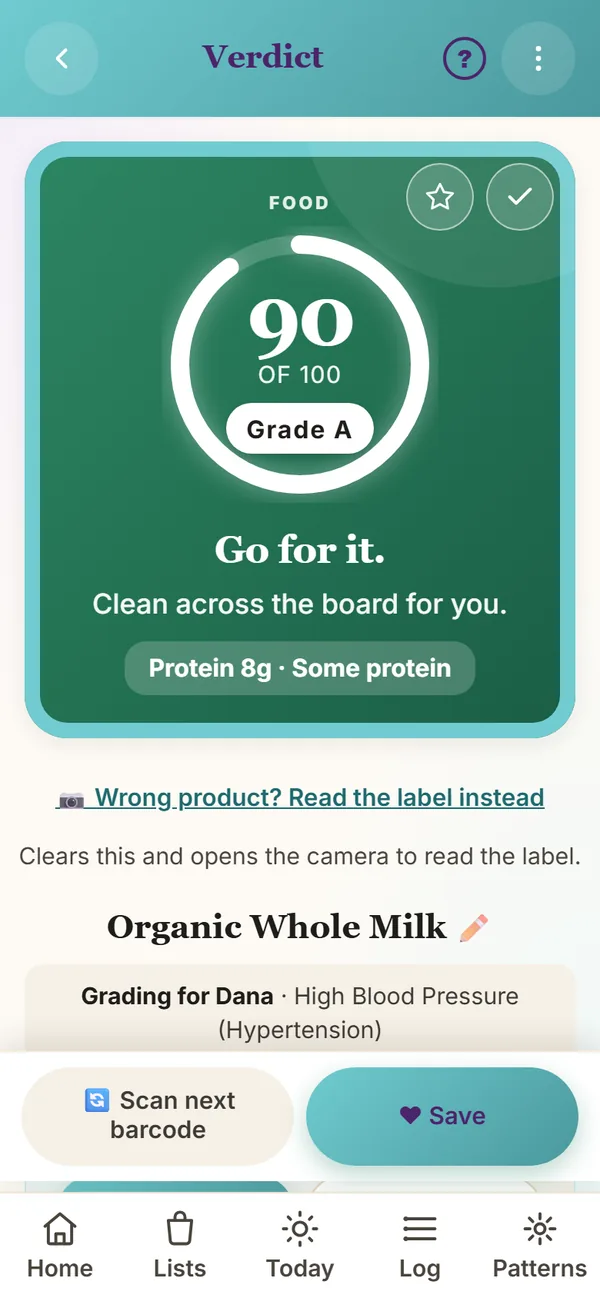
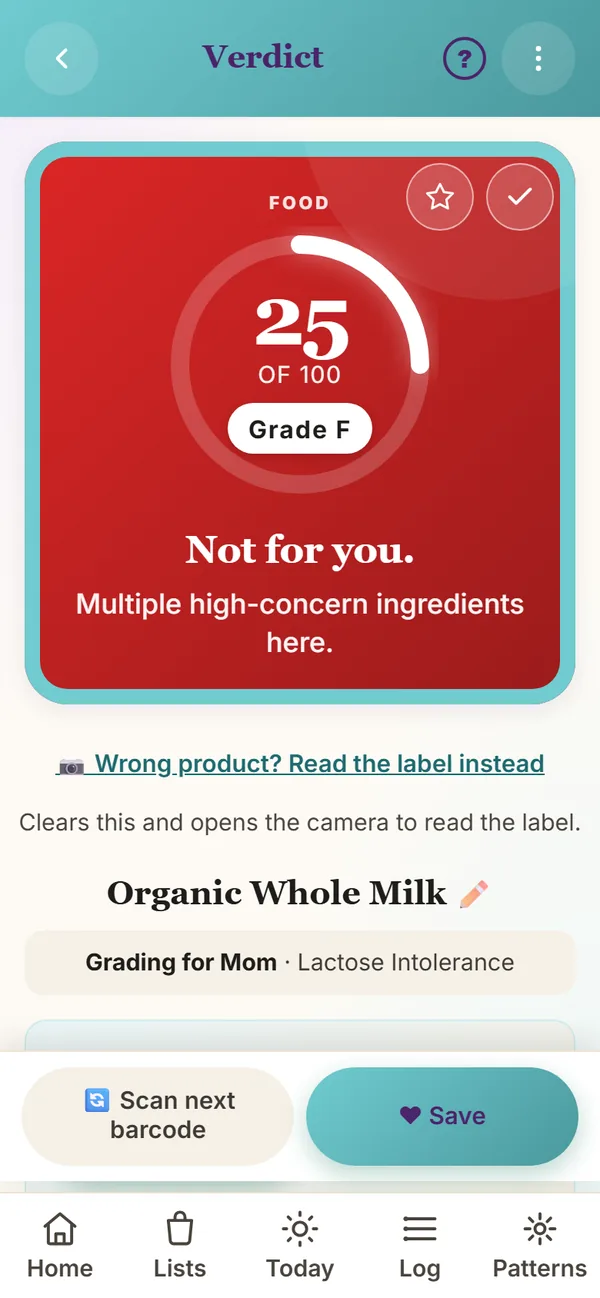
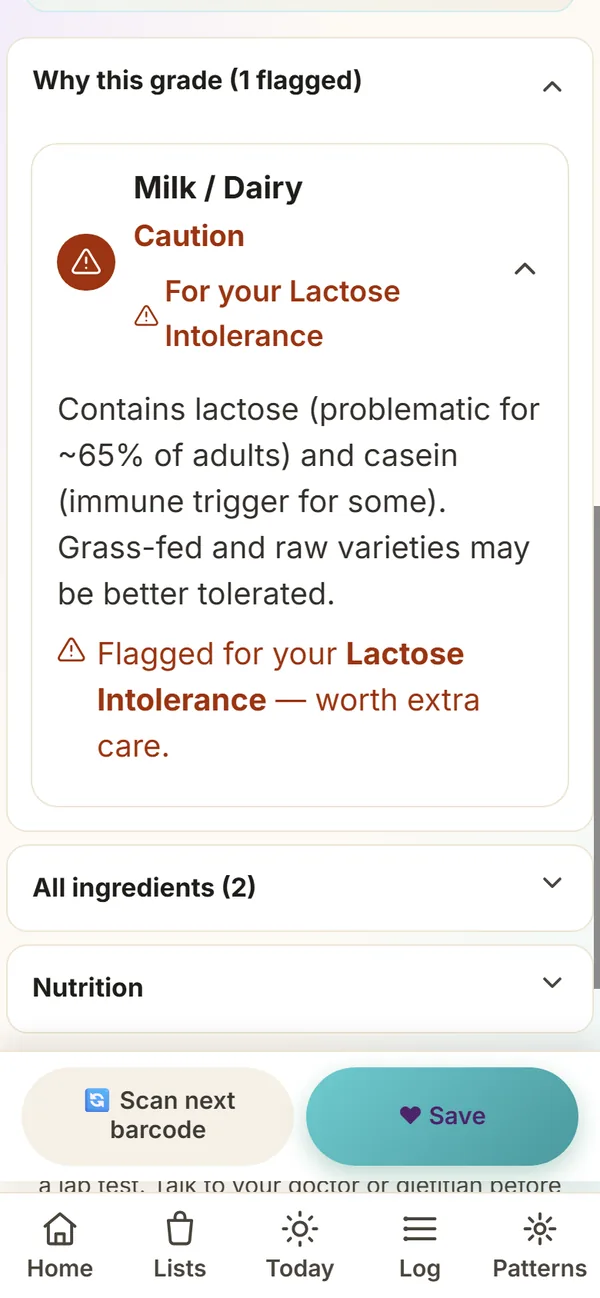
The Verdict screen — the heart of the app
Already shown on the home page. The grade card and the “grading for you” chips come first, then sections you open with a tap: Why this grade (already open on a C, D or F), Better picks, All ingredients and Nutrition per serving. Every ingredient is tappable for what it is and why it matters for you.
How the grades work
Every food gets a number from 0–100 and a letter grade A–F. The grade is personalized to your conditions — the same food can grade differently for different people.
- AGo for it.85–100 · Clean for you. Add to your safe list.
- BLooks pretty good.70–84 · A couple of minor things to keep an eye on.
- CSure, occasionally.55–69 · Cleaner options exist if you want one.
- DMaybe skip this one.35–54 · Several ingredients worth avoiding for you.
- FNot for you.0–34 · Multiple high-concern ingredients here.
140+ conditions and protocols across every life stage and eating pattern
The chips on each grade tell you which of your conditions weighed in. Pick what applies — full list here.
What “personalized” actually means
Pick from 140+ conditions and protocols across 11 plain-English categories — metabolic, autoimmune, cardiovascular, digestive, neurological, hormonal/reproductive, kidney/liver, respiratory, mental-health-adjacent, weight-management programs (incl. GLP-1), and life stages (pregnancy, perimenopause, postmenopause).
Hashimoto’s gets sugar + fiber + iron + vit D + sat fat. Crohn’s gets protein + iron + vit D + calcium + sat fat. ME/CFS bumps sodium up. Same scan, different lens.
Checked against published sources
Every condition flag — for food, personal care and supplements — is checked against published research and guidelines, and the sources are listed.
A flag tells you what the research says about that ingredient for that condition, not what someone on the internet thinks.
My goals — what you’re working toward
Goals are gentler than conditions — they nudge ingredients toward foods that support what you’re after, but a condition always wins if the two disagree.
Pick up to 5
Support metabolic health · Lower inflammation · Build or preserve muscle · Heart health · Brain and cognitive health · Calmer, less-reactive skin · Fewer breakouts · Aging gracefully · A stronger moisture barrier.
Whatever you’re optimizing for beyond your conditions, Velrae reads the label through that lens too.
AIP — the rule book, automated
Native support for the Autoimmune Protocol — elimination, then reintroduction.
Start your elimination phase
Hit Start elimination in Settings. Every disallowed food (nightshades, eggs, dairy, nuts, seeds, alcohol, grains, legumes, sugar) auto-flags as Avoid with a phase-specific reason. In reintroduction, the active food gets tagged so symptoms after eating it pair with your diary entry.
AIP is hard. Velrae handles the rule book so you can focus on how your body actually responds.
How you felt, what you ate, your numbers
Side by side, one day at a time.
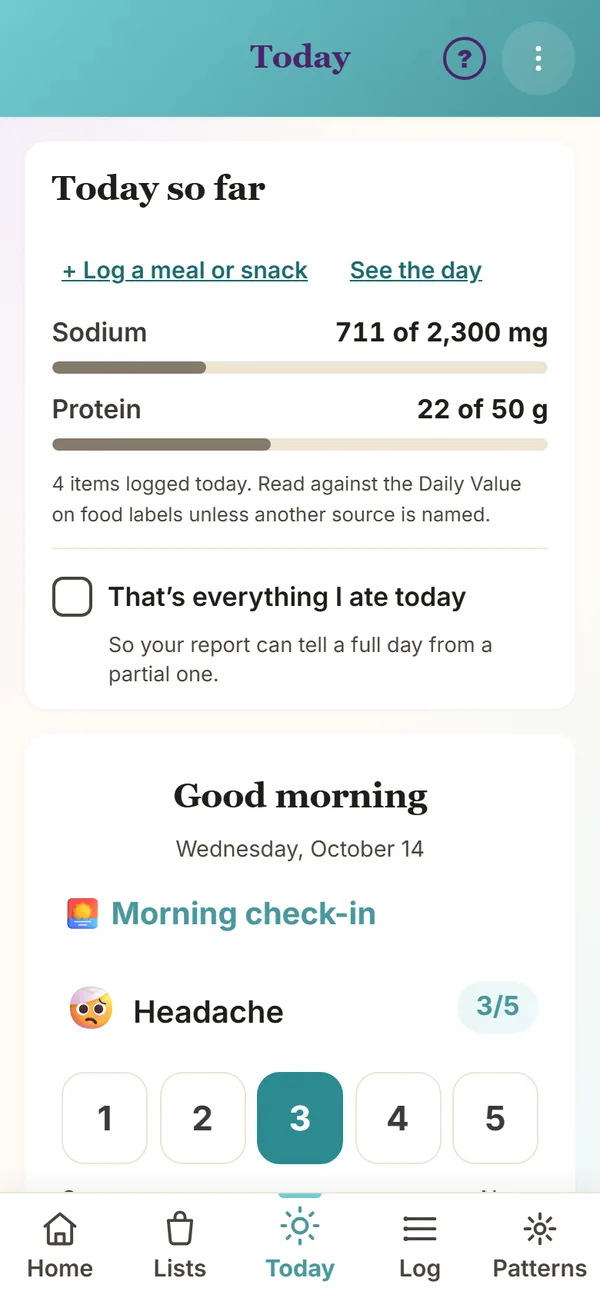
Today — how you feel becomes the signal
Five big buttons, 1 to 5, for each row. Seven seconds. The rows follow what applies to you — Bloating for IBS, Hot flashes for perimenopause, Skin for eczema — and you can track more. The food log alone shows what you ate; pair it with how you felt and Velrae can show what lines up.
Seven seconds a day builds your personal trigger list. Velrae compares the days you felt off against the meals before them and shows what they had in common.
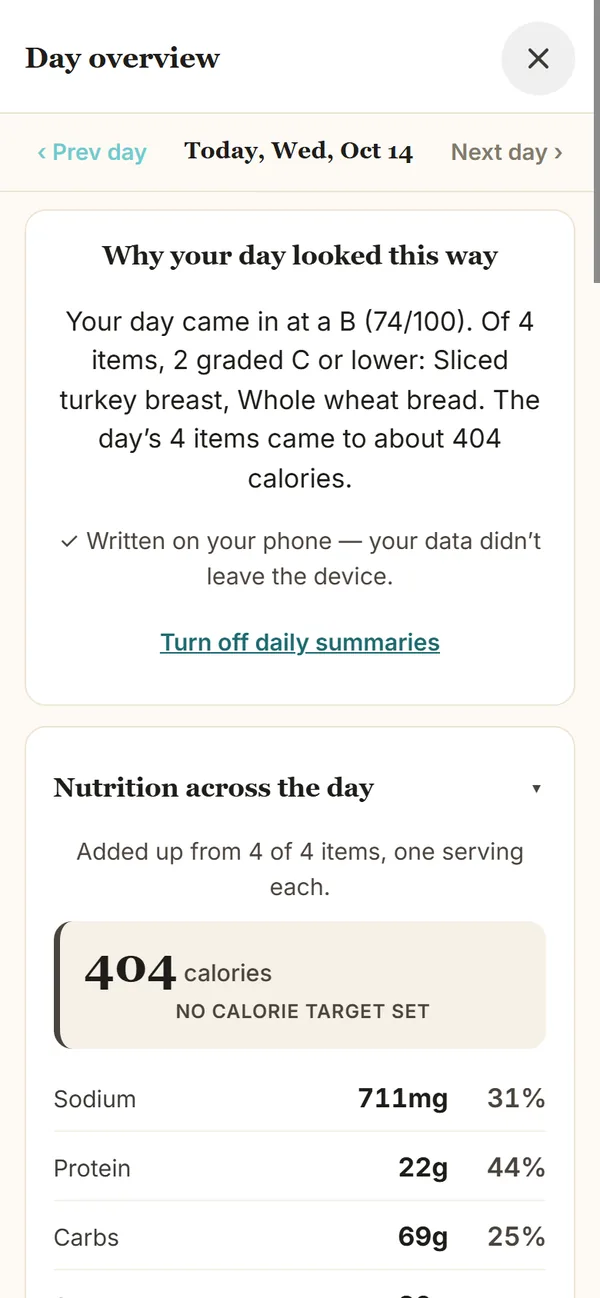
Day Overview — your whole day in 10 seconds
Tap any day’s grade chip in the Log tab. Velrae adds up what you logged and reads each number against a target — the Daily Value on food labels unless you choose another, like the American Heart Association’s 1,500 mg for sodium, or your doctor’s number. Turn on the daily summary and it reads the day back in plain English.
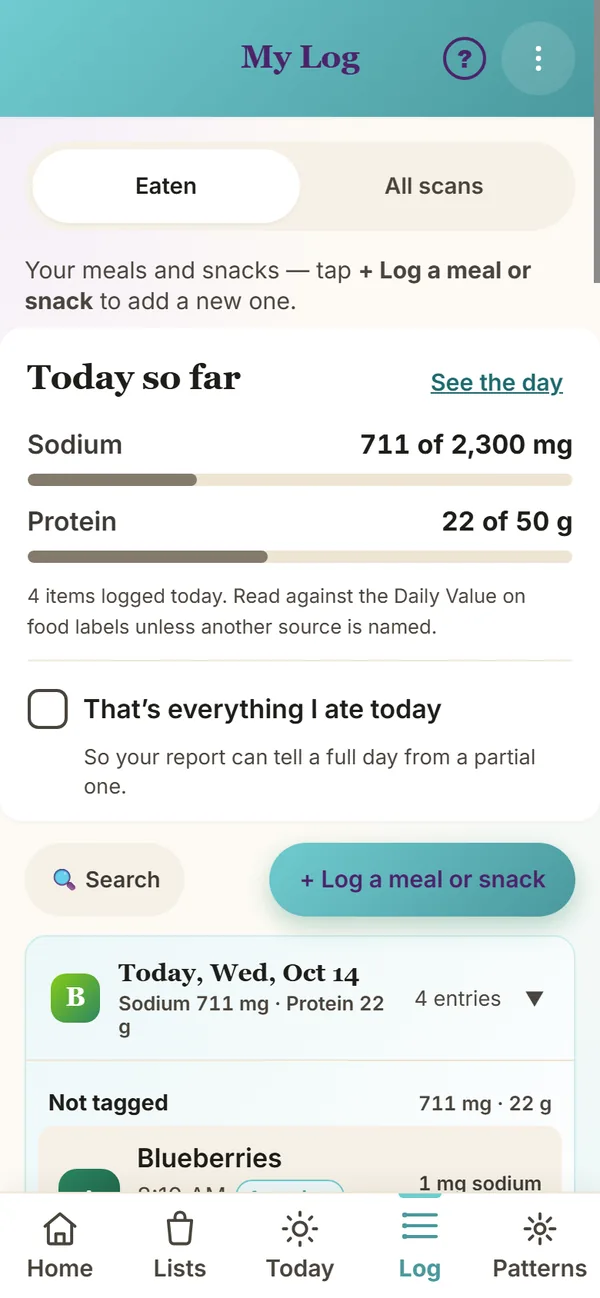
Log — every day, every meal, color-graded at a glance
Eaten · My safe list · Pantry · All scans. Each day pill carries a small grade chip so you can spot a three-F streak without scrolling through every scan.
Numbers I track — BP, weight, glucose
Your numbers and your food, in one place. So when your doctor asks “what changed,” the answer is already on your phone.
Multi-reading per day · each reading with its own time · logged with your meal that morning
One reading per day · BMI shows if you’ve saved a height · trend line over time
Multiple readings per day · fasting / post-meal tagged · alongside what you ate
Hidden by default. We only show what you’ve told us applies to you. Add any of them on, anytime, in Settings.
The whole picture, on one screen
Every day your diary shows: how you felt (a few 1-to-5 check-ins), what you ate (food log with grades), and your numbers for the day. Three signals, side by side. Nothing else is doing this in one place.
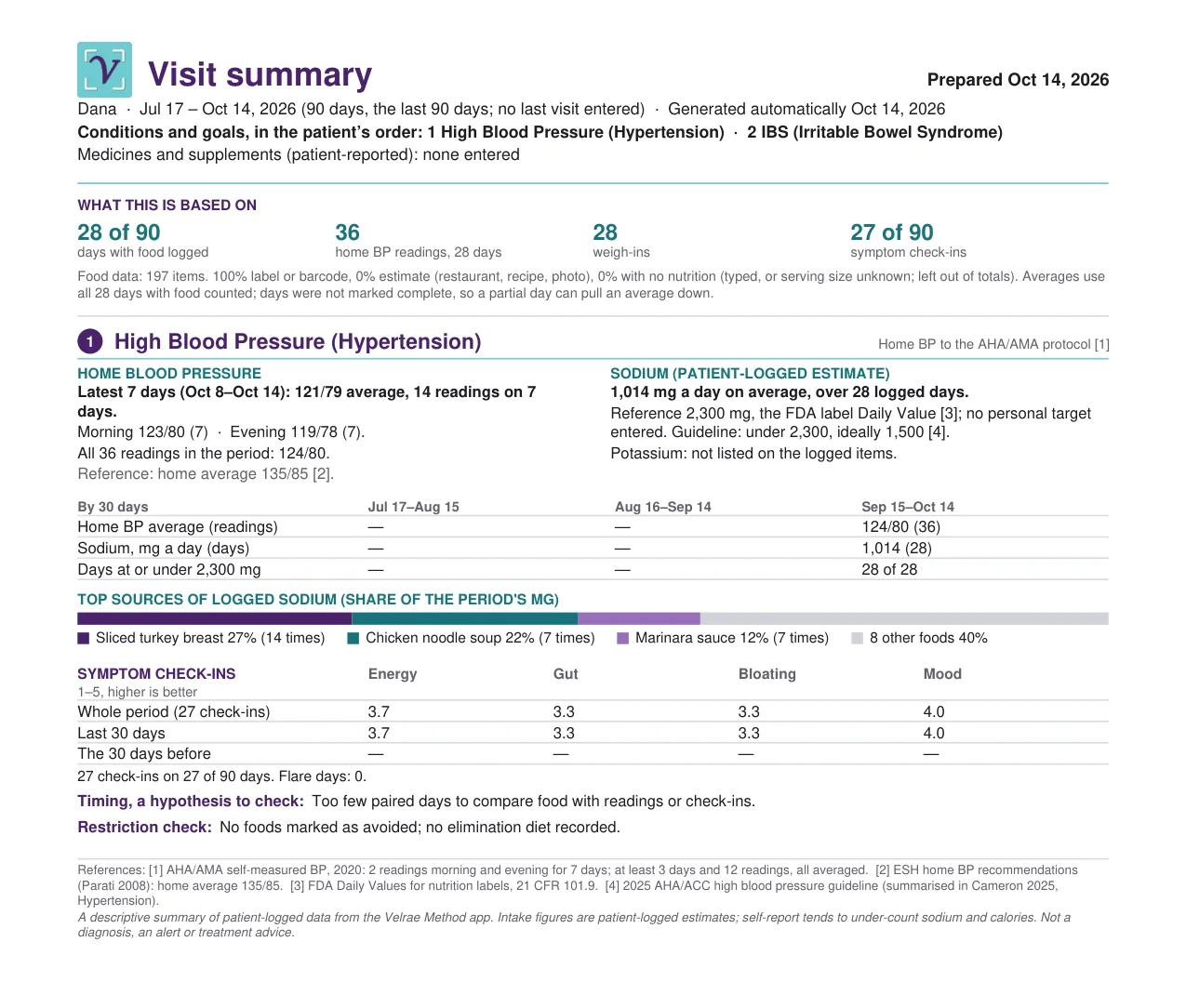
Walk into your doctor’s office with what you ate, how you felt, and what your numbers did since your last visit — all in one visit summary.
What lines up, and what to bring
Patterns from your own days, and a summary to hand your doctor.
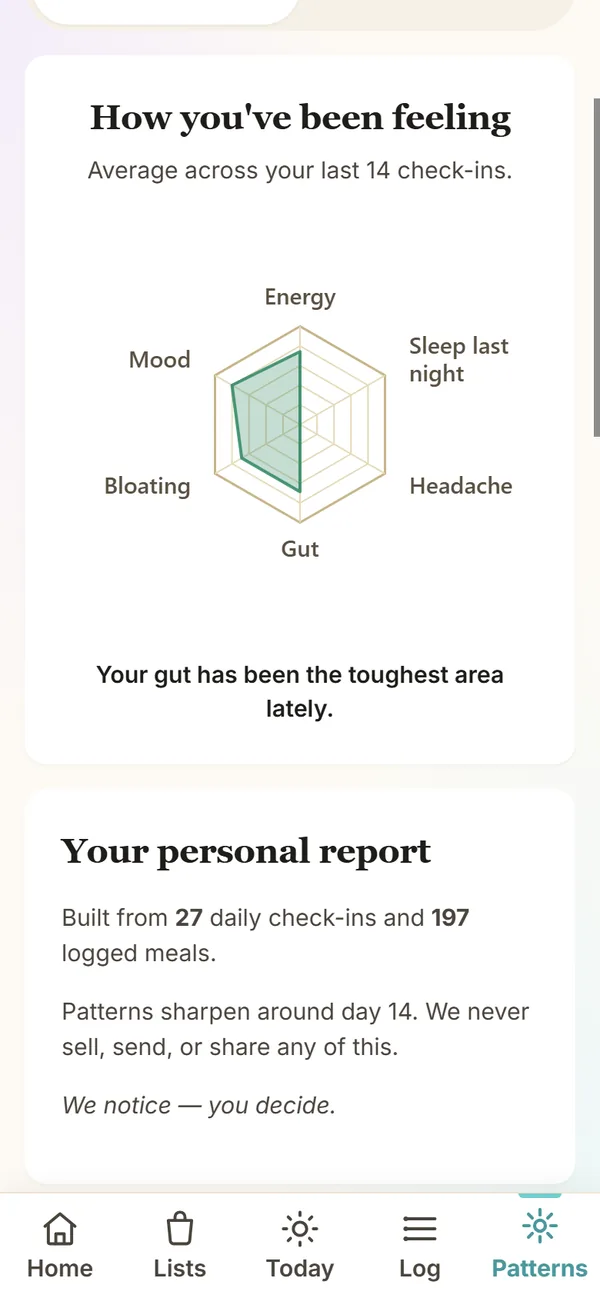
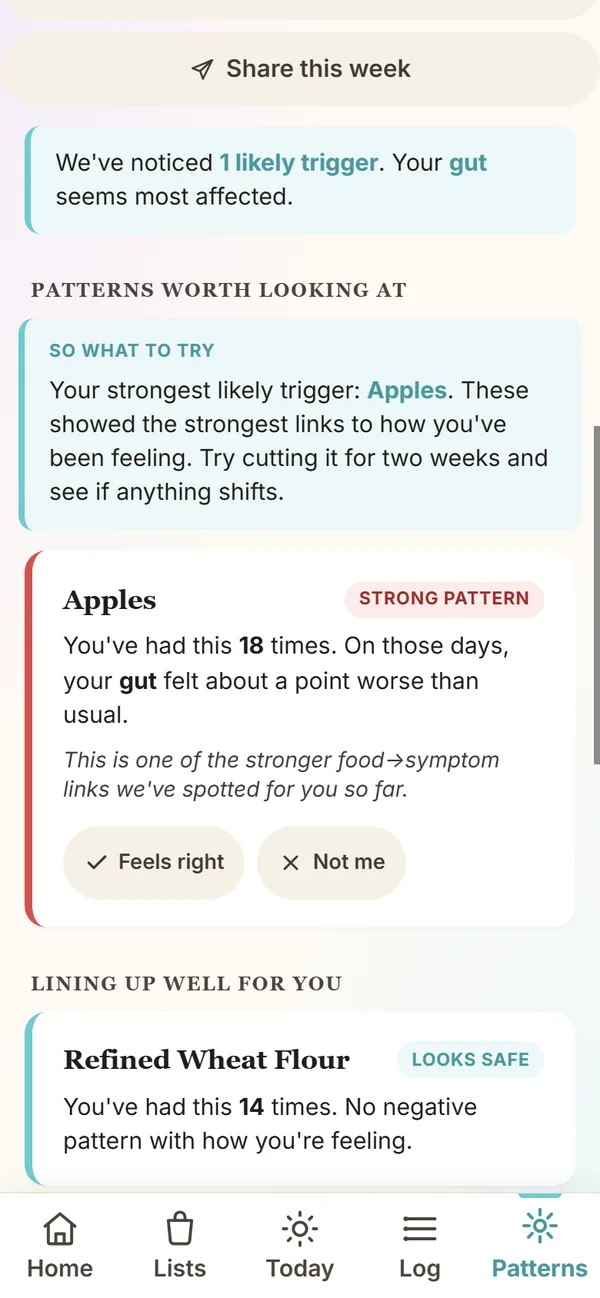
Patterns — your private health intelligence
The longer you use the app, the smarter it gets — about you. Patterns sharpen around day 14.
Early-pattern cards
When Velrae spots a candidate trigger — “you’ve had this 4 times; on those days your energy felt about a point worse than usual” — it asks Feels right or Not me. You teach it. It listens.
Personal trigger identification, not generic “avoid these 50 foods” advice.
So-what-to-try suggestions
“Your top 3 for sleep: Caramel Color, Turkey, Honey. Try skipping them for two weeks and see if your sleep feels steadier.”
Actionable two-week experiments, picked from your actual diary — not someone else’s study.
☝ See it live above — tap the Patterns tab in the app preview.
A visit summary for your doctor
Everything since your last visit, with page one laid out the same way every time.
Made when you need it
Settings → Report for your doctor → Make my visit summary. It opens with your questions, then your numbers and what you logged. Every target names its source, food amounts are marked as your own estimate, and timing between food and readings is shown as counts — never as a cause. An optional second page is for a dietitian.
Hand the phone to your doctor. The conversation starts on the third minute, not the thirteenth. More about the visit summary →
Your month and Your week
Two pages just for you: what went well, what drove your main number, your numbers against last month, and one goal you set yourself. Past months save automatically.
The doctor’s page stays plain. Yours can cheer you on.
For the whole house, your way
Profiles, backups, and settings for comfort.
Profiles — one phone, multiple bodies
Each profile is its own world
Each profile carries its own conditions, log, scan history, triggers, goals. Switch between them at the top of the home screen. Lock the one you don’t want shared with a PIN.
Mom shops for herself; daughter shops for Mom; the app knows which body the grade is for.
Download my data · per profile
Each profile has its own “Download my data” button. Yours forever, your phone, your files.
No one is holding your health journal hostage.
Backup — your data is yours
Download or restore at any time
Email myself a backup sends you a copy that’s encrypted and locked to your email, so only you can open it. Restore it on a new phone with the same email. Each profile also has a Download my data button. We don’t keep a copy, so backups make you portable, not dependent on us.
Switch phones, hand a tablet to a parent, retire an old device — nothing’s held hostage.
Accessibility — your app, your eyes, your way
Built for the elderly user as the north star. All of it lives in Settings → Comfort & display.
Text size
Normal · Larger · Largest. Pick once. Reaches every screen, button and label. Today and a verdict’s reasons start larger by default.
Readable across the grocery aisle, with or without reading glasses.
High contrast
Switches the palette to stronger color differences. Grade colors stay the same — everything around them gets bolder.
Glare-friendly, low-vision-friendly. Same app, sharper edges.
Reduce motion
Turns off the animations that move between screens.
Calmer experience for motion-sensitive eyes — or anyone who just prefers it still.
Nutrition on every verdict
Sodium, protein, sugar and saturated fat per serving, read off the label. Show or hide it under What shows on your screens, or from any verdict.
Off if numbers stress you out. On if you like them.
Daily summary on the Day Overview
A short read of why your day looked the way it did, under What shows on your screens. Keep it, or just see the grades and lists.
Storytelling or just-the-facts. Your call.
Themes — pick the color that feels like you
Nine palettes. None of them ever change the grade colors — only the chrome around them.
Teal · Ocean · Blue · Purple · Rose · Red · Coral · Gold · Slate
Picking a different look changes the menus, not the grade colors. Green always means “good for you.”
Your phone, your aesthetic — but the grade language stays universal across every profile in your house.
Voice input — talk to it like a person
Wherever a text field takes more than a few words
Mic button on the scan ingredients box, the meal builder, the diary notes, the shopping list, the conditions search. Dictate — Velrae fills it in.
No tiny phone keyboard. No squinting in the grocery aisle. Accessibility as a pillar, not an afterthought.
Get it on your phone — works with no signal
On the App Store and Google Play
Download Velrae Method from the App Store or Google Play. The grading rules and your journal live on your phone, so a pasted ingredient list or a product you’ve scanned before grades with no signal. Looking up a new barcode and Smart Scan need a connection.
Your diary, check-ins and numbers work on a plane or in the back corner of the store.
Help when you want it
Setup asks three questions — including whether you’re scanning for yourself or someone you care for. Everything else is asked later, where it’s needed, and you can skip it. The Help guide explains every Settings card in plain English, and Check for updates sits at the top of Settings.
Up and scanning in under a minute.
Pay yearly, or once
No monthly bill. Two ways to buy — whichever fits your budget.
$29.99 / year · or $59.99 once
Both unlock the full Velrae Method: condition personalization for all 140+ conditions and protocols, AIP tracker, doctor-ready PDF, family profiles, every future feature. Use it on this device and up to two more.
Lifetime is one payment, yours forever. After the free trial, barcode scans stay free. More on pricing →